
How to Register for the SAT Exam: A Beginner's Guide We Know
- h vasgare
- Jul 15
- 6 min read

Applying to college can feel like trying to solve a massive puzzle, and for many high schoolers, the SAT is one of the most critical pieces. Now that the exam is fully digital globally, the signup process is smoother than ever, but it still requires careful planning.
Whether you are aiming for domestic universities or looking to study abroad, this complete walkthrough will teach you how to register for the SAT exam without the stress. From managing deadlines and costs to setting up your testing device, here is everything you need to know for the 2026 testing cycle.
Why the Digital SAT in 2026 is Different
The SAT has fully transitioned to a digital format via the College Board's proprietary Bluebook app. Gone are the days of filling in bubble sheets with No. 2 pencils. Today, you bring your own fully charged laptop or tablet (or request one from the College Board during registration) to complete the test.
Because the exam is digital, you will need to complete an essential "Exam Setup" in your Bluebook app 1 to 5 days before your scheduled test date. This final step generates your official admission ticket, which is mandatory for entry on test day.
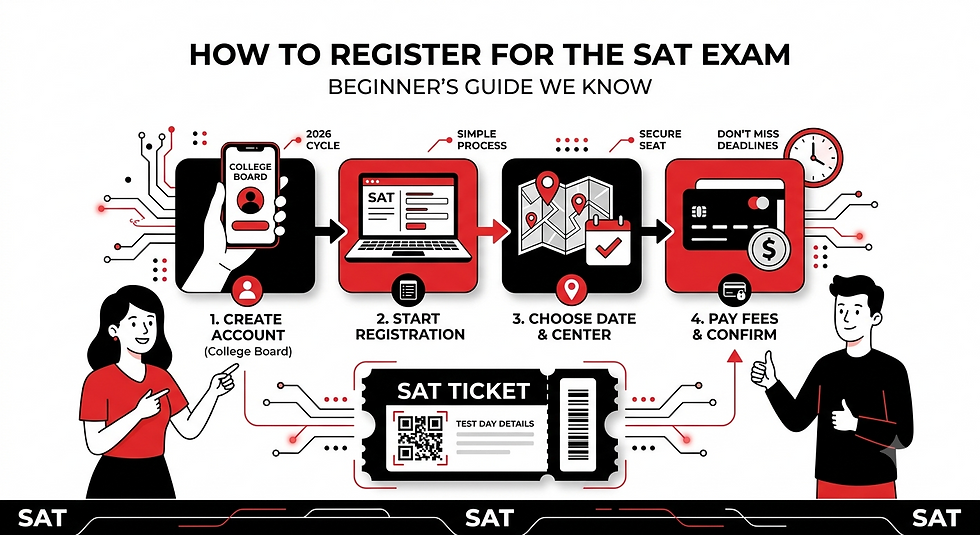
Step-by-Step Guide: How to Register for the SAT Exam
Securing your seat requires a systematic approach. Follow these precise steps to navigate the College Board portal successfully.
1.Create or Log In to Your College Board Account:Takes 5–10 minutes.
Go directly to the official College Board website. If you do not have an account, click Create Account and register as a student. Make sure the name you use matches the legal name on your passport or government-issued ID card exactly—discrepancies can bar you from entering the test center.
2.Start Your SAT Registration:Takes 15–20 minutes.
Once logged in, click on Register for the SAT. You will be asked to fill out a detailed student profile questionnaire. While most questions about your GPA and extracurricular activities are optional, take your time filling out the academic details accurately.
3.Choose Your Test Date and Center:Requires early planning.
Select your preferred test administration date from the 2026 calendar. Afterward, search for available test centers near you using your city name or zip code. Popular test centers often fill up months in advance, so lock yours in as early as possible.
4.Upload a Compliant Photo:Must meet safety standards.
You must upload a clear, passport-style headshot. Ensure your face is fully visible, centered, and set against a plain background. Avoid wearing hats, sunglasses, or applying heavy digital filters. This photo will display on your admission ticket and on the test administrator's roster.
5.Review, Pay, and Confirm:Secures your registration.
Review your selected center, date, and personal details carefully. Submit your payment using a valid credit card, PayPal, or enter your fee waiver code if eligible. Once paid, check your inbox for a confirmation email.
2026 SAT Test Dates and Deadlines
The College Board administers the SAT multiple times throughout the year. To avoid late fees, you must finalize your registration at least two weeks before your target test date.
The table below highlights the confirmed test dates and registration deadlines for the fall 2026 season:
2026 SAT Test Date | Registration Deadline | Late Registration Deadline |
August 22, 2026 | August 7, 2026 | August 11, 2026 |
September 12, 2026 | August 28, 2026 | September 1, 2026 |
October 3, 2026 | September 18, 2026 | September 22, 2026 |
November 7, 2026 | October 23, 2026 | October 27, 2026 |
December 5, 2026 | November 20, 2026 | November 24, 2026 |
Note: If you need to borrow a physical testing device from the College Board, you must register and request it at least 30 days before the test date.
Understanding SAT Registration Costs & Fees
Understanding the overall price tag of the exam is just as important as knowing how to register for the SAT exam. Fees differ depending on whether you are testing within the United States or internationally.
Standard Fees (Domestic vs. International)
United States: The standard base registration fee is $68.
International (e.g., India, UK, Middle East): International test-takers pay the base $68 fee plus a regional fee (typically $43). For example, in India, the total standard registration fee is $111 (approximately ₹9,500 to ₹11,800 depending on local taxes and currency rates).
Additional Services and Penalty Fees
To keep costs low, try to avoid making changes after your initial registration. If you need to make changes, these are the standard fees charged by the College Board:
Late Registration Fee: +$38 (charged if you sign up after the regular deadline but before the late deadline).
Change Test Center: +$34 (to move to a different location on the same test date).
Test Cancellation Fee (Before Deadline): $34 deduction (you will be refunded your registration fee minus this cost).
Late Cancellation Fee (After Deadline): $44 deduction.
Strict Identification (ID) Requirements
The College Board enforces incredibly strict security procedures at test centers. If your ID does not meet their criteria, you will not be allowed to test, and your registration fees will not be refunded.
What is Accepted:
For US Test Centers: A valid, physical, government-issued driver's license, state ID card, or passport.
For International Test Centers (including India): A valid, physical, and unexpired passport is generally the only accepted form of identification.
Warning: School ID cards, Aadhaar cards, national identity cards, or photocopies/digital images of your ID on a phone are not accepted as primary identification at international testing hubs. Your physical passport must be present on your desk during the entire exam.
Common Registration Pitfalls to Avoid
Even though learning how to register for the SAT exam is straightforward, many students still run into avoidable issues. Keep these four common mistakes in mind:
Using a Nickname: Ensure the name on your College Board profile matches your official government ID word-for-word. If your passport says "Thomas" but your registration profile says "Tommy," you will be turned away on test day.
Waiting Until the Last Minute: High-demand testing locations in major cities (such as Mumbai, Dubai, New York, or London) routinely fill up 6 to 8 weeks before the actual test date. Registering early guarantees you a seat nearby and saves you from paying a $38 late fee.
Forgetting the Bluebook Exam Setup: Simply paying for the test online is not enough. You must download the Bluebook app onto your testing laptop or tablet and complete the digital setup during the week leading up to your exam. This is the only way to obtain your required admission ticket.
Missing Free Score Reports: Every registration includes four free score reports to send to universities. However, you must designate these recipient colleges within 9 days after your test date. If you miss this window, sending your scores will cost $15 per report.
Frequently Asked Questions (FAQ)
What is the easiest way on how to register for the SAT exam?
The fastest and most secure way to register is online through the official College Board SAT registration portal. The online process takes about 20 to 30 minutes and gives you real-time access to available test dates and local test centers.
Can I reschedule my SAT exam date once registered?
Strictly speaking, you cannot directly "reschedule" a digital SAT exam to a new date. If you must switch dates, you will need to cancel your existing registration (which incurs a cancellation fee of $34 or $44 depending on when you cancel) and then register for the new test date from scratch, paying the standard registration fee again.
What devices are compatible with the Bluebook testing app?
You can take the Digital SAT on a personal or school-managed Windows laptop, a Mac laptop, an iPad, or a school-owned Chromebook. Mobile phones are not compatible with the Bluebook application.
How do I apply for an SAT fee waiver?
If you are a low-income high school student in the US, you may qualify for an SAT fee waiver through your school counselor. A fee waiver covers the complete cost of two SAT registrations, waives late registration and cancellation fees, and provides unlimited free score reports to colleges.
Ready to Start Your College Prep Journey?
Now that you know exactly how to register for the SAT exam, it is time to take action. Don't wait until seats in your area are completely booked! Head over to the official portal, choose your ideal test date, and secure your testing spot today.
Register for the Exam: Visit the College Board SAT Portal to create your student profile and book your seat.
Start Your Free Practice: Once registered, download the official Bluebook Testing App to take realistic, adaptive practice exams and build your confidence.


Comments